NETRESEC Network Security Blog - Tag : FlowCarp

rss Google News

Remcos Alerts from FlowCarp in EveBox

There is a wonderful little web-based alert and event front-end called EveBox, which renders Eve JSON formatted data to a web UI. This blog post demonstrates how EveBox can be used to show alert and flow information that FlowCarp has extracted from a Remcos malware infection.

pcap to FlowCarp to json to EveBox

Remcos RAT

The starting point of my analysis will be a PCAP file with network traffic from a Remcos RAT infection, which Brad Duncan has published on Malware-Traffic-Analysis.net. The password scheme for the zip file containing the PCAP can be found here, in case you'd like to follow along and perform the same analysis steps yourself. All commands and examples in this blog post can be run in both Linux and Windows.

JSON formatted alerts and flow data can be extracted from the PCAP file with FlowCarp like this:

flowcarp --input 2026-03-12-SmartApeSG-ClickFix-activity-for-Remcos-RAT.pcap --format EveJson --output -

But the free community license of FlowCarp doesn't include a protocol model for Remcos, which is why this command will generate flow events but no alerts about detected Remcos malware traffic. I will therefore submit the pcap file to the free FlowCarp demo server instead, which has a commercial license that can identify over 600 protocols. No registration or API key is required to use this demo server (as long as users behave − please behave).

curl --data-binary @2026-03-12-SmartApeSG-ClickFix-activity-for-Remcos-RAT.pcap -o remcos-eve.json https://demo.flowcarp.com

The downloaded remcos-eve.json file uses the Suricata Eve JSON format, so jq queries typically used to process Suricata eve.json log files can be used to parse and filter the JSON output from FlowCarp as well.

  • jq -c 'select(.event_type=="alert")|[.dest_ip, .dest_port, .proto, .alert.signature]' < remcos-eve.json
  • ["193.178.170.155",443,"TCP","MALWARE protocol detected: TLS, Remcos"]

This FlowCarp alert indicates that the PCAP file contains TLS-encrypted Remcos traffic, which means that FlowCarp has performed a so-called sub-protocol match to detect the protocol inside of TLS without decrypting the TLS layer. A quick way to verify if this traffic is Remcos in TLS is to check the JA3 hash or JA4 fingerprint of the client's TLS handshake.

  • tshark -r 2026-03-12-SmartApeSG-ClickFix-activity-for-Remcos-RAT.pcap -Y "ip.dst == 193.178.170.155 and tls.handshake" -T fields -e tls.handshake.ja3 -e tls.handshake.ja4
  • a85be79f7b569f1df5e6087b69deb493 t13i010400_0f2cb44170f4_5c4c70b73fa0

This nicely matches what we expect to see from TLS encrypted Remcos traffic. For reference these are the JA3 and JA4 fingerprints typically associated with Remcos:

  • JA3: a85be79f7b569f1df5e6087b69deb493
  • JA4: t13i010400_0f2cb44170f4_5c4c70b73fa0
  • JA4: t13i010400_0f2cb44170f4_1b583af8cc09

There is always a risk of false positives associated with JA3 or JA4 fingerprints, so a rule of thumb is to not blindly trust JA3/JA4 based alerts without having additional indicators of compromise. FlowCarp performs a much deeper identification of sub-TLS protocols than JA3/JA4, but there's still a false positive risk associated with detection of encrypted malware traffic — so make sure to verify alerts like this with other types of data sources, such as event logs from the infected device or OSINT information about the suspected C2 server. For this alert we can see that @DonPasci has reported 193.178.170.155:443 to ThreatFox as being a Remcos C2 server.

EveBox

EveBox is a web-based front-end for Suricata "EVE" alerts and events, created by Jason Ish. The EveBox source code lives on GitHub and pre-built EveBox binaries for Linux and Windows are available on evebox.org.

This evebox command will fire up a browser and render information about the flows and alerts in the Eve JSON file from FlowCarp:

evebox oneshot remcos-eve.json
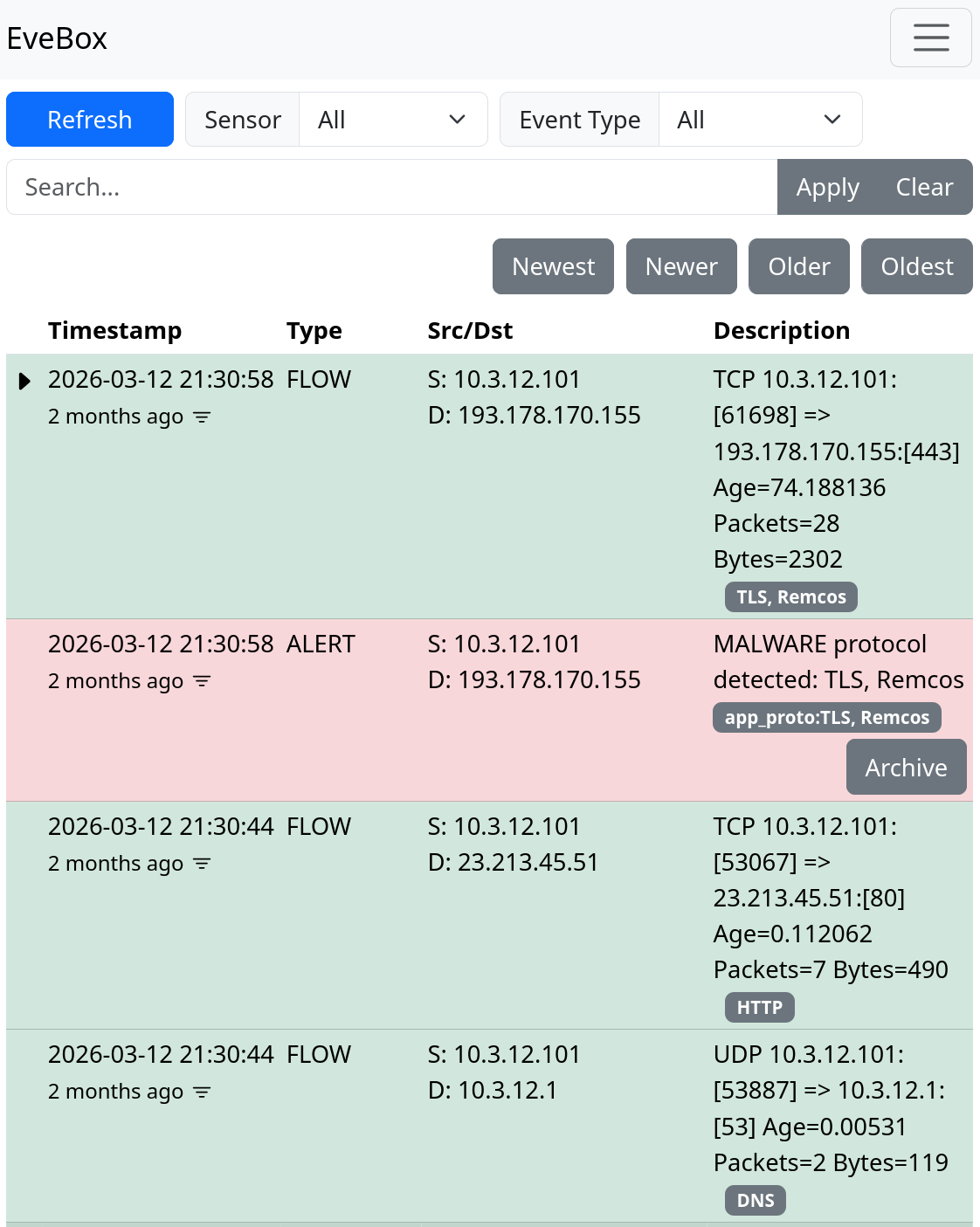
Remcos events from FlowCarp in EveBox

The flows and alerts are displayed in reverse order, so that the most recent events are on top. The Remcos alert stands out in red and immediately catches your eye. Let's change Event Type from "All" to "Alert" just to make sure there are no other alerts.

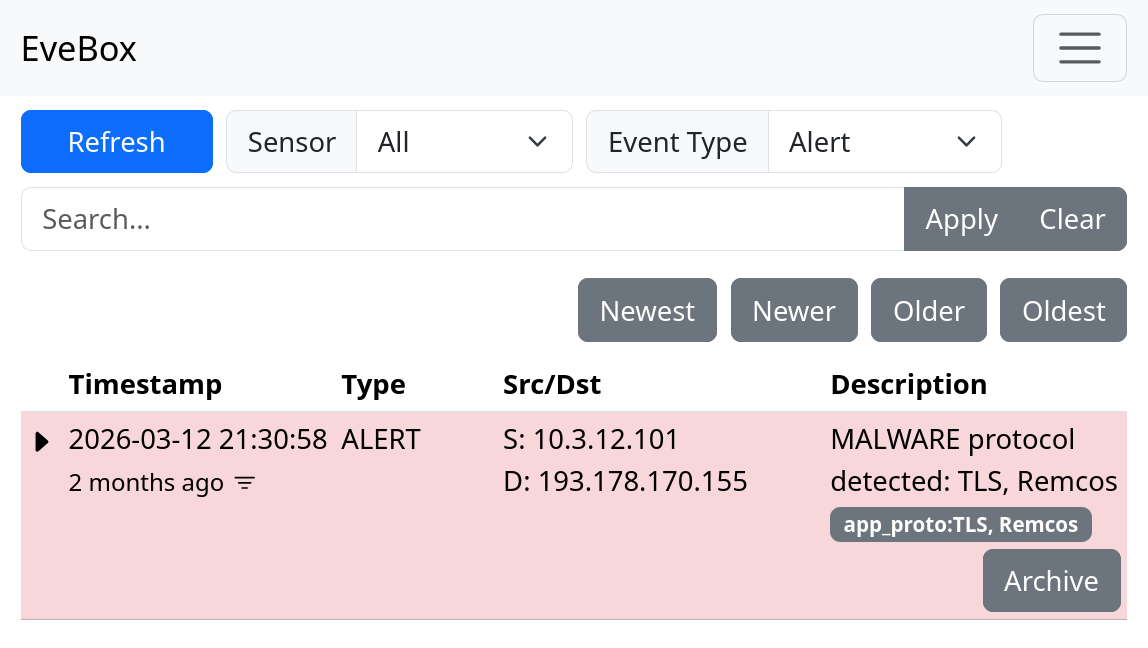
Remcos alert from FlowCarp in EveBox

Looks like this was the only alert in this JSON file.

EveBox is built for Suricata, but it's really nice that it can be used out-of-the-box to read FlowCarp's JSON logs as well. For reference, let's also see what it looks like when we run the same PCAP file through Suricata and import eve.json into EveBox.

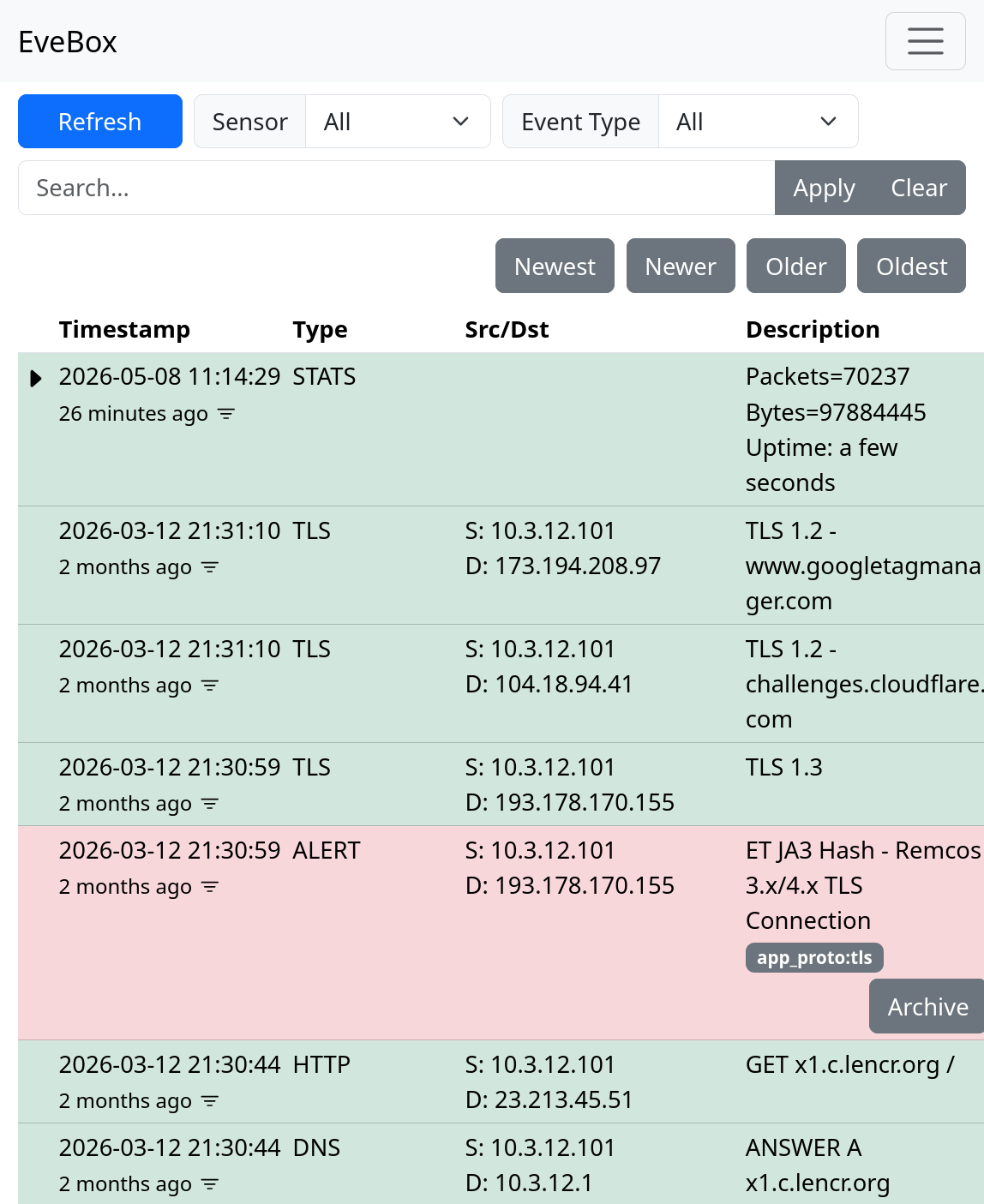
Remcos events from Suricata in EveBox

I'm happy to see that Suricata also alerts on the same TCP session as FlowCarp. This alert was raised by the Emerging Threats signature ID 2036594, which triggers whenever the JA3 hash of a TLS handshake is a85be79f7b569f1df5e6087b69deb493.

Posted by Erik Hjelmvik on Friday, 08 May 2026 11:49:00 (UTC/GMT)

Tags: #FlowCarp #Remcos #a85be79f7b569f1df5e6087b69deb493 #t13i010400_0f2cb44170f4_5c4c70b73fa0 #t13i010400_0f2cb44170f4_1b583af8cc09

Short URL: https://netresec.com/?b=2659fc0


FlowCarp Identifies Protocols

FlowCarp logo

I am thrilled to announce the release of a brand new tool called FlowCarp!

FlowCarp is a simple command line tool that performs a very complicated task. It identifies the application layer protocol in network traffic without relying on port numbers, static signatures or code that tries to parse the application layer protocols. Instead, FlowCarp simply computes some statistical measurements on the traffic it sees and compares those measurements to models of known protocols. This allows FlowCarp to identify even proprietary and undocumented protocols, including malware C2 protocols.

FlowCarp Demo Service

There’s a demo FlowCarp web service running on demo.flowcarp.com, which accepts PCAP or PcapNG data via HTTP POST requests. The demo service returns a data structure, which follows the Suricata Eve JSON format, containing flows and alerts. I’d like to stress, however, that the returned flow and alert data is generated by FlowCarp and NOT by Suricata. The Suricata Eve JSON format supports pretty much everything we look for in a good flow and alert output format, which is why we decided to use their format instead of inventing yet another JSON based log format.

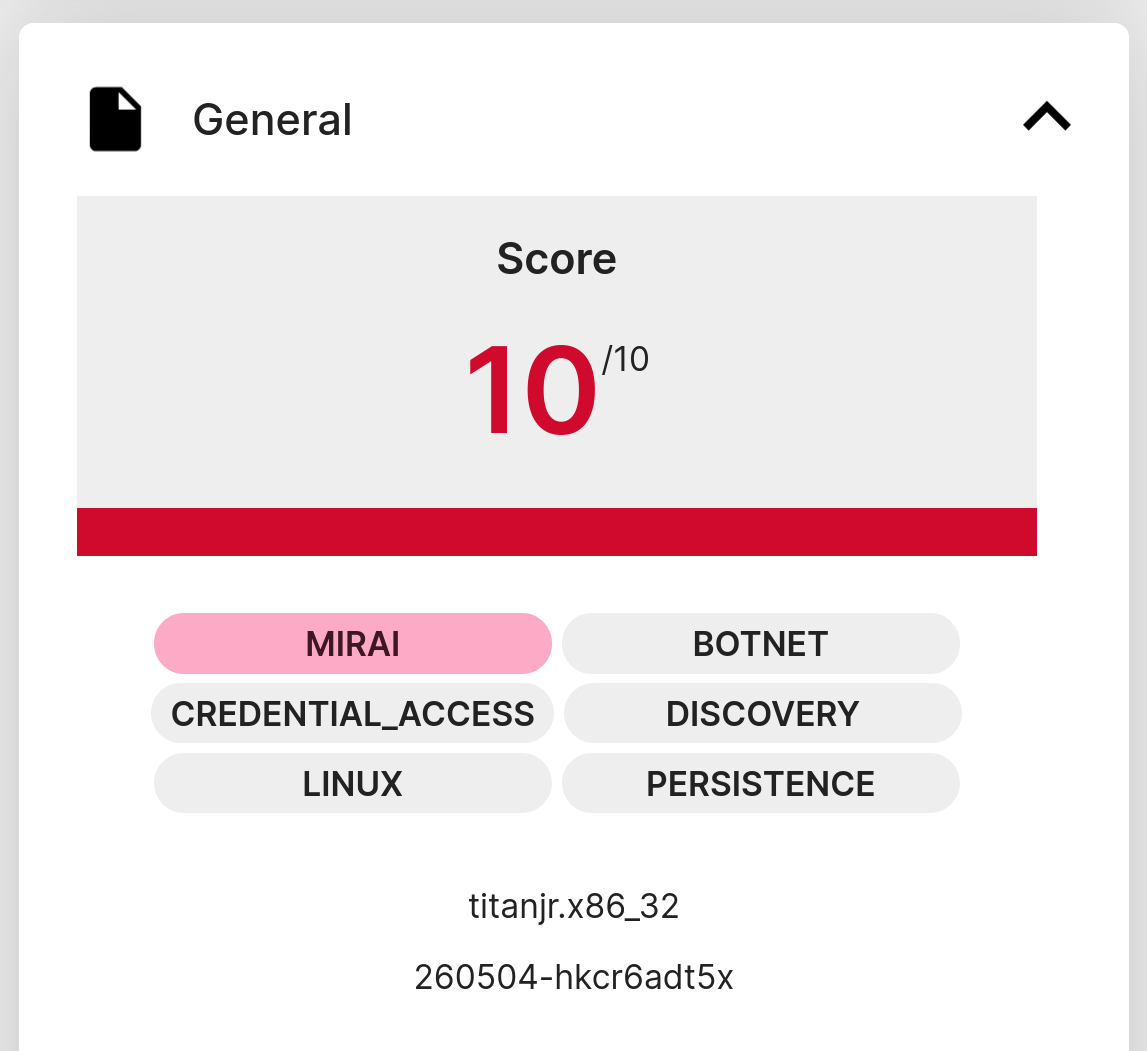
Let’s give the FlowCarp demo server a spin to see what it can do! I’ll start by downloading the PcapNG file from a suspected Mirai sample execution on Recorded Future’s Triage sandbox.

260504-hkcr6adt5x on Tria.ge

I’ve saved the capture file from Triage locally as “260504-hkcr6adt5x-behavioral1.pcapng”. This file can now be submitted to the FlowCarp demo service like this:

curl --data-binary @260504-hkcr6adt5x-behavioral1.pcapng -o mirai-eve.json https://demo.flowcarp.com

The generated mirai-eve.json file should now contain information about the flows and alerts that FlowCarp has found in the pcapng file. Let’s check which unique services that were contacted in the sandbox execution of this malware sample. I’m using jq to filter on event_type “flow” to show connection information instead of alerts.

  • jq -c 'select(.event_type=="flow")|[.dest_ip, .dest_port, .proto, .app_proto]' < mirai-eve.json | sort -u
  • ["107.189.17.70",80,"TCP","Mirai"]
  • ["107.189.17.70",80,"TCP",null]
  • ["1.1.1.1",53,"UDP","DNS"]
  • ["185.125.188.61",443,"TCP","DNS"]
  • ["185.125.188.62",443,"TCP","DNS"]
  • ["224.0.0.251",5353,"UDP","DNS"]
  • ["44.219.148.160",443,"TCP","TLS"]
  • ["84.17.50.24",443,"TCP","DNS"]
  • ["84.17.50.8",443,"TCP","TLS"]
  • ["8.8.8.8",53,"UDP","BACnet"]
  • ["8.8.8.8",53,"UDP","DNS"]
  • ["8.8.8.8",53,"UDP","GTPv2"]

Alright, let’s see if any of those connections generated an alert:

  • jq -r -c 'select(.event_type=="alert")|[.dest_ip, .dest_port, .proto, .alert.signature]' < mirai-eve.json | sort -u
  • ["107.189.17.70",80,"TCP","MALWARE protocol detected: Mirai"]

FlowCarp tells us that the malware implant is using the Mirai C2 protocol to connect to a C2 server on TCP 107.189.17.70:80.

Running FlowCarp Locally

You can, of course, run FlowCarp locally on your own computer or in a container/pod instead of using the demo service. There are pre-compiled binaries of FlowCarp available for download on flowcarp.com for most platforms.

Let’s re-analyze the Mirai pcapng file, which was sent to the online demo service, but this time FlowCarp will run locally.

  • ./flowcarp --input 260504-hkcr6adt5x-behavioral1.pcapng --output - 2>/dev/null | cut -d, -f 2,3,4 | sort -u
  • 107.189.17.70:80, TCP
  • 107.189.17.70:80, TCP, Mirai
  • 1.1.1.1:53, UDP, DNS
  • 185.125.188.61:443, TCP, DNS
  • 185.125.188.62:443, TCP, DNS
  • 224.0.0.251:5353, UDP, DNS
  • 44.219.148.160:443, TCP, TLS
  • 84.17.50.24:443, TCP, DNS
  • 84.17.50.8:443, TCP, TLS
  • 8.8.8.8:53, UDP, DNS

I let FlowCarp use its CSV output format instead of Eve JSON here, which is why cut was used to filter the output instead of jq. Nevertheless, the results are pretty much the same as before; FlowCarp detects Mirai traffic to 107.189.17.70:80.

You can try sending this same capture file to an IDS of your choice to see what alerts you get. Chances are that you might not get any alert for the Mirai traffic, since it is rather tricky to create good signatures for the Mirai C2 protocol. FlowCarp, on the other hand, doesn’t need any signatures to detect a protocol. All that is needed to build detection in FlowCarp is some example traffic of the protocol you’d like to identify. This unique feature is what makes FlowCarp so fantastic!

Real-Time Protocol Identification

FlowCarp is designed to run fast and use little resources, so that it can be used for local real-time analysis of network traffic. My general recommendation would be to run FlowCarp as a systemd service or to put it in a container or pod, but if you just want to test its real-time abilities then I suggest that you run this command:

tcpdump -U -w - | flowcarp --input - --realtime --preview --output -

FlowCarp will then read real-time PCAP data from standard input and print flow information – with identified application protocols – to standard output.

FlowCarp can also read real-time packet data through PCAP-over-IP, which allows us to utilize services like Fox-IT’s pcap-broker. You can start a pcap-broker listener like this:

./pcap-broker -listen 127.0.0.1:57012 -cmd "sudo tcpdump -i eth0 -U -w -"

FlowCarp can then access a real-time packet stream from the pcap-broker:

./flowcarp --input tcpconnect:127.0.0.1:57012 --realtime --preview --output -

I hope you'll find FlowCarp useful!

Posted by Erik Hjelmvik on Monday, 04 May 2026 14:53:00 (UTC/GMT)

Tags: #FlowCarp #protocol identification #Triage #tcpdump

Short URL: https://netresec.com/?b=265d268