NETRESEC Network Security Blog - Tag : Periodicity

rss Google News

How to Identify IcedID Network Traffic

Brad Duncan published IcedID (Bokbot) from fake Microsoft Teams page earlier this week. In this video I take a closer look at the PCAP file in that blog post.

Note: This video was recorded in a Windows Sandbox to minimize the risk of infecting the host PC in case of accidental execution of a malicious payload from the network traffic.

As I have previously pointed out, IcedID sends beacons to the C2 server with a 5 minute interval. According to Kai Lu’s blog post A Deep Dive Into IcedID Malware: Part 2, this 5 minute interval is caused by a call to WaitForSingleObject with a millisecond timeout parameter of 0x493e0 (300,000), which is exactly 5 minutes.

UPDATE 2023-03-22

In the research paper Thawing the permafrost of ICEDID Elastic Security Labs confirm that IcedID's default polling interval is 5 minutes. They also mention that this interval is configurable:

Once initialized, ICEDID starts its C2 polling thread for retrieving new commands to execute from one of its C2 domains. The polling loop checks for a new command every N seconds as defined by the g_c2_polling_interval_seconds global variable. By default this interval is 5 minutes, but one of the C2 commands can modify this variable.

The IcedID trojan uses a custom BackConnect protocol in order to interact with victim computers through VNC, a file manager or by establishing a reverse shell. There was no IcedID BackConnect traffic in this particular PCAP file though, but severalother IcedID capture files published on malware-traffic-analysis.net do contain IcedID BackConnect traffic. For more information on this proprietary protocol, please see our blog post IcedID BackConnect Protocol.

IOC List

Fake Microsoft Teams download page

  • URL: hxxp://microsofteamsus[.]top/en-us/teams/download-app/
  • MD5: 5dae65273bf39f866a97684e8b4b1cd3
  • SHA256: e365acb47c98a7761ad3012e793b6bcdea83317e9baabf225d51894cc8d9e800
  • More info: urlscan.io

IcedID GzipLoader

  • Filename: Setup_Win_13-02-2023_16-33-14.exe
  • MD5: 7327fb493431fa390203c6003bd0512f
  • SHA256: 68fcd0ef08f5710071023f45dfcbbd2f03fe02295156b4cbe711e26b38e21c00
  • More info: Triage

IcedID payload disguised as fake gzip file

  • URL: hxxp://alishabrindeader[.]com/
  • MD5: 8e1e70f15a76c15cc9a5a7f37c283d11
  • SHA256: 7eb6e8fdd19fc6b852713c19a879fe5d17e01dc0fec62fa9dec54a6bed1060e7
  • More info: IcedID GZIPLOADER Analysis by Binary Defense

IcedID C2 communication

  • IP and port: 192.3.76.227:443
  • DNS: treylercompandium[.]com
  • DNS: qonavlecher[.]com
  • X.509 certificate SHA1: b523e3d33e7795de49268ce7744d7414aa37d1db
  • X.509 certificate SHA256: f0416cff86ae1ecc1570cccb212f3eb0ac8068bcf9c0e3054883cbf71e0ab2fb
  • JA3: a0e9f5d64349fb13191bc781f81f42e1
  • JA3S: ec74a5c51106f0419184d0dd08fb05bc
  • Beacon interval: 5 minutes
  • More info: ThreatFox

Network Forensics Training

Check out our upcoming live network forensics classes for more hands-on network forensic analysis. Our current class material doesn’t include any IcedID traffic though, instead you’ll get to investigate C2 traffic from Cobalt Strike, TrickBot, njRAT, Meterpreter and a few others.

Posted by Erik Hjelmvik on Wednesday, 15 February 2023 10:52:00 (UTC/GMT)

Tags: #IcedID #CapLoader #Video #Periodicity #GzipLoader #a0e9f5d64349fb13191bc781f81f42e1 #ec74a5c51106f0419184d0dd08fb05bc

Short URL: https://netresec.com/?b=23242ad


Detecting Cobalt Strike and Hancitor traffic in PCAP

This video shows how Cobalt Strike and Hancitor C2 traffic can be detected using CapLoader.

I bet you’re going:

😱 OMG he’s analyzing Windows malware on a Windows PC!!!

Relax, I know what I’m doing. I have also taken the precaution of analyzing the PCAP file in a Windows Sandbox, which just takes a couple of seconds to deploy and run.

The capture file I’m looking at is called “2021-05-13-Hancitor-traffic-with-Ficker-Stealer-and-Cobalt-Strike.pcap” and can be downloaded from here: https://malware-traffic-analysis.net/2021/05/13/index.html

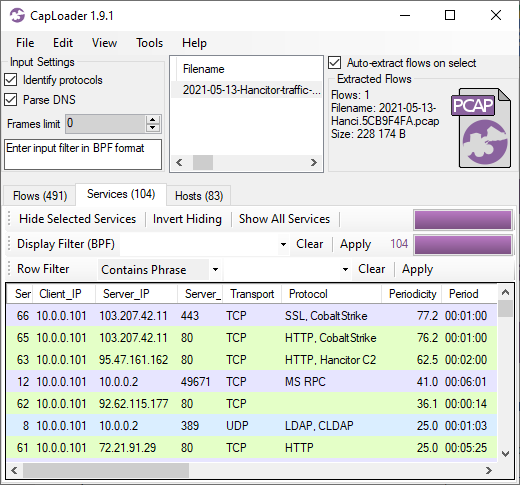
CapLoader’s Services tab shows us that the connections to TCP 80 and 443 on 103.207.42.11 are very periodic, with a detected period of exactly 1 minute. CapLoader successfully identifies the protocols for these two services as Cobalt Strike over HTTP and Cobalt Strike over SSL, respectively. The third service in this list is also very periodic, that’s the Hancitor trojan beaconing to its C2 server every two minutes.

Services tab in CapLoader

CapLoader uses machine learning to identify the application layer protocol based on the behavior of the traffic, not the port number. This means that there can be false positives, i.e. the protocol classification that CapLoader gives a flow or service might be wrong. It is more common, however, for CapLoader to yield false negatives, which means that it can't identify the protocol. The detection of Cobalt Strike inside of HTTP and SSL traffic was recently introduced in the latest 1.9 release of CapLoader. I expected this feature to detect Cobalt Strike traffic in HTTP, but I was delighted to see that CapLoader often detects even TLS encrypted Cobalt Strike beaconing with really good precision!

As shown in the video, the Cobalt Strike beacon config can easily be extracted from the network traffic using NetworkMiner and Didier Stevens’ 1768 K python script.

The output from Didier’s 7868.py tool looks something like this:

0x0001 payload type 0 windows-beacon_http-reverse_http
0x0002 port 80
0x0003 sleeptime 60000
0x0004 maxgetsize 1048576
0x0005 jitter 0
0x0007 publickey 30819f30[...]
0x0008 server,get-uri '103.207.42.11,/ca'
[...]

As you can see, it uses HTTP for transport with a “sleeptime” of 1 minute (60000 ms) and 0% jitter. This means that a new connection will be made to the Cobalt Strike C2 server every minute. The fact that there was no jitter is what gives this service such a high value in CapLoader’s “Periodicity” column.

Network Forensics Training

Are you interested in learning more about how to analyze network traffic from Cobalt Strike and other backdoors, malware and hacker tools? Then take a look at the live online network forensics classes I will be teaching in September and October!

Posted by Erik Hjelmvik on Monday, 31 May 2021 08:30:00 (UTC/GMT)

Tags: #Netresec #Cobalt Strike #CobaltStrike #periodicity #Protocol Identification #PIPI #CapLoader #1768.py #Windows Sandbox #PCAP #NSM #video #videotutorial

Short URL: https://netresec.com/?b=21536fc


CapLoader 1.9 Released

CapLoader 1.9 Logo

A new version of the PCAP filtering tool CapLoader has been released today. The new CapLoader version 1.9 is now even better at identifying protocols and periodic beacons than before. The user interface has also been improved to make it easier to filter and drill down in network traffic to extract interesting, malicious or unusual traffic.

More Protocols Identified

We’ve added port-independent protocol detection for over 20 new protocols since the last release. The newly added protocols include some that are used by malicious tools and backdoors such as hTran, RevengeRAT, Tofsee and Winsecsrv, as well as legitimate protocols like WireGuard (VPN) and RemoteFX (UDP based remote desktop). We’ve also improved our support for ICS traffic analysis by adding protocol identification of SCADA protocols DNP3 and IEC 60870-5-104.

CapLoader also detects what we call “sub-protocols”, which are communication protocols that use other L7 protocols as transport. We have extended the sub-protocol detection in CapLoader 1.9 to include traffic like Anchor_DNS and dnscat traffic, which both run on top of DNS. We have also added detection of Cobalt Strike beacons over HTTP and HTTPS, even though the latter is quite difficult to detect due to the application data being encrypted.

Improved Usability

CapLoader 1.9 comes with several user interface improvements that help you solve the “needle in the haystack” problem even more efficiently than before.

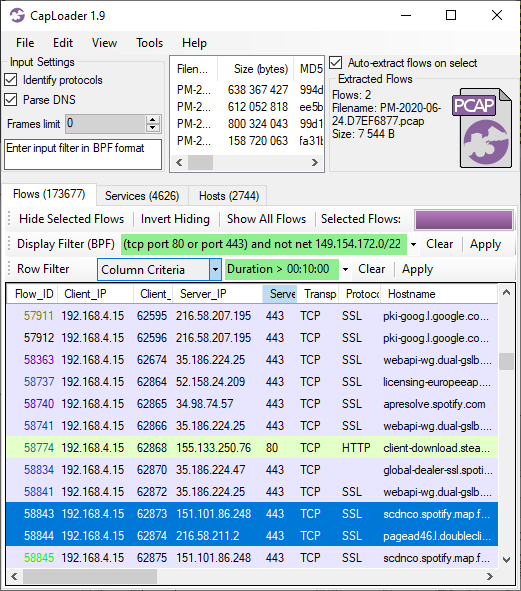
The context menus in the Flows, Services and Hosts tabs can now be used to select rows based on values in any column, such as “Select all flows where Duration > 10 minutes” (when right-clicking a 10 minute flow).

The “Keyword Filter” is now called “Row Filter” in order to avoid getting it mixed up with the “Find Keyword” feature. The Row Filter has also been enhanced with a new filtering mode, to complement the Contains / All Words / Any Words / RegEx options, which is called “Column Criteria”. The Column Criteria can be used to filter the displayed rows based on the values in a user-specified column. The Column Criteria “Duration > 00:10:00” will, for example, only show flows that are 10 minutes or longer, while “ASN = 3301” shows the flows going to Telia’s AS3301.

CapLoader 1.9 with Column Criteria Row Filter Duration > 00:10:00

Image: CapLoader with Row Filter Column Criteria "Duration > 00:10:00"

We have also extended CapLoader's BPF implementation to support VLAN id’s, so that you can use expressions like “vlan 100” as input filter as well as display filter. The BPF implementation also supports logic operators, so that more advanced filters like “(tcp port 80 or port 443) and not net 149.154.172.0/22” can be used.

CapLoader has a method for detecting periodic connection patterns, which was introduced in CapLoader 1.4. This feature can be used to detect clients that connect to a service at regular intervals, such as a beacon used for command-and-control or email client connecting to a mail server. We have improved the periodicity detection in CapLoader 1.9 so that it now detects periodic services more accurately.

The Initial Round Trip Time (iRRT) in the Flows and Services tabs is now measured in milliseconds instead of seconds in order to avoid “bulky numbers” (h/t Eddi).

There was previously a significant delay when selecting many flows at once (like 100.000). We’ve improved the performance of this feature in CapLoader 1.9, so that you can now select several hundred thousands flows at once without having to wait for an unresponsive GUI to update.

More OSINT Lookup Services

A feature in CapLoader that often comes in handy is the ability to right-click a flow, service or host and open a website with OSINT information about the clicked IP address or domain name. We have now replaced some of the OSINT services with new better ones.

The new services we’ve added to CapLoader 1.9 for performing online OSINT lookups of IP addresses, network services and domain names are:

Bug fixes and Credits

Several bugs have been fixed in this new release of CapLoader, much thanks to feedback we’ve received from our users. We’d like to thank Anders Regert and Mandy van Oosterhout for reporting bugs in CapLoaders “Save As” feature. We’d also like to thank Hyun Dowon for reporting a snap length corruption bug that previously appeared when exporting flows from Pcap-NG files We have also fixed an issue where capture files were previously not always merged in chronological order when being aggregated.

Updating to the Latest Release

Users who have purchased a license for CapLoader can download a free update to version 1.9 from our customer portal. All others can download a free 30 day trial from the CapLoader product page (no registration required).

Posted by Erik Hjelmvik on Tuesday, 25 May 2021 12:20:00 (UTC/GMT)

Tags: #Netresec #CapLoader #PCAP #Pcap-NG #IEC-104 #CobaltStrike #BPF #periodicity #OSINT

Short URL: https://netresec.com/?b=2159bda