

PolarProxy 2.0 Released

A new major release of PolarProxy is out with a self-contained single-file binary, expanded platform support (musl/ARM64), and improved container and service plumbing.
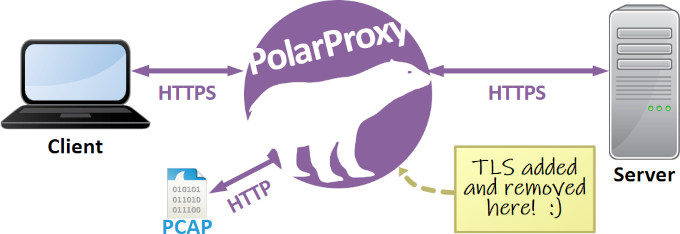
PolarProxy is a transparent TLS/SSL inspection proxy built for incident responders, malware analysts and security researchers. It decrypts and re‑encrypts TLS traffic and writes decrypted sessions to PCAP for analysis in Wireshark or an IDS.
What's new
- Packaged as a self-contained, single-file binary for easier installation and management.
- Improved HTTP proxy server: support for unencrypted HTTP traffic with --nontls allow
- Upgraded runtime: migrated from .NET 8 to .NET 10.
- More supported platforms: Linux musl (Alpine) builds for the ARM64 architecture added.
- Simplified container deployment: Dockerfile and docker-compose.yml included with all musl/Alpine releases.
- Service installer for Linux: systemd unit (polarproxy.service) and install script included in non-musl Linux releases.
-
New runtime flags:
- --tlstimeout <seconds> — sets a TLS handshake/authentication timeout.
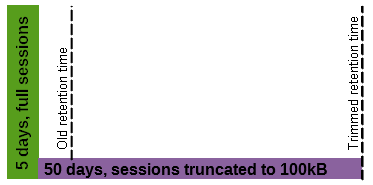
- --cutoff <bytes> — limits PCAP output to the specified number of bytes per flow.
Why this release matters
- Self-contained single binary simplifies deployment and maintenance. This is a breaking change, at least for container/pod deployments, so make sure to validate your deployment before rolling out the new 2.0 release to production.
- The .NET 10 upgrade brings improved runtime performance and security updates.
- Better container support with musl/Alpine build for ARM64 in addition to existing x64 builds, and simplified container deployments with included config files.
- The new timeout for TLS handshakes improves error handling of connections to broken TLS middleboxes and extremely slow web servers.
- The flow cutoff CLI option enables users to prevent large downloads from filling up disk volumes. This setting also limits the per-flow size of decrypted traffic that is made available through PCAP-over-IP.
Quick start for Linux (regular user)
-
Download the appropriate tar archive for your platform (see download links).
-
Create directory:mkdir ~/PolarProxy
-
Change directory:cd ~/PolarProxy/
-
Extract the archive:tar -xzf ~/Downloads/PolarProxy_2.0.0_linux-x64.tar.gz
- Create log directory:sudo mkdir -p /var/log/polarproxy
-
Change log dir owner:sudo chown "$USER" /var/log/polarproxy
-
Start PolarProxy:./PolarProxy -p 10443,80,443 --socks 1080 --httpconnect 8080 --nontls allow --certhttp 10080 -x /var/log/polarproxy/polarproxy.cer -f /var/log/polarproxy/proxyflows.log --pcapoverip 0.0.0.0:57012 -o /var/log/polarproxy/ -v
Quick start for Linux with systemd
- Download the appropriate tar archive for your platform (see download links).
- Create and change into a new temp directory:cd $(mktemp -d)
-
Extract the archive:tar -xzf ~/Downloads/PolarProxy_2.0.0_linux-x64.tar.gz
- Run install script:sudo ./install-polarproxy-service.sh
- Show service status:systemctl status polarproxy.service
- Show logs:sudo journalctl -t polarproxy
The install script creates a system user “polarproxy”, a systemd service called “polarproxy.service”, and then starts that service. You are, of course, free to modify the installation script and polarproxy.service file if you want a different configuration.
Quick start for Alpine Docker
- Download the appropriate Linux musl archive for your platform (see download links).
- Create and change into a new temp directory:cd $(mktemp -d)
- Extract:tar -xzf ~/Downloads/PolarProxy_2.0.0_linux-musl-x64.tar.gz
- Deploy to docker:sudo docker compose up -d --build
- Show container status:sudo docker ps --filter "name=polarproxy"
- Show logs:sudo docker logs polarproxy
The docker-compose.yml will create a container named “polarproxy” with a non-root user called “polarproxy” without a password.
Listening services in quick start examples
All three quick start deployments above expose the following TCP ports:
- 10443 — Transparent TLS proxy
- 1080 — SOCKS server
- 8080 — HTTP Proxy server
- 10080 — Web server hosting the root CA certificate
- 57012 — PCAP-over-IP server providing decrypted traffic
A port forwarding (DNAT) firewall rule must be configured, which redirects TCP 443 traffic to the transparent TLS proxy, in order to run PolarProxy as a transparent TLS proxy that intercepts outgoing TLS traffic. See the Routing Option alternatives on the official PolarProxy page for more details.
Decrypted traffic from all proxy services is accessible through the PCAP-over-IP service on TCP port 57012. They are also written to PCAP files in /var/log/polarproxy/.
Test your deployment
Download PolarProxy’s root CA certificate:
Convert to PEM format:
Monitor decrypted traffic via PCAP-over-IP in one terminal/shell:
Test transparent proxy in another terminal/shell:
Test SOCKS proxy:
Test HTTP proxy:
Downloads and docs
See the PolarProxy product page for downloads, full command-line options, sample configurations etc.
Feel free to share feedback or report bugs about PolarProxy.
Posted by Erik Hjelmvik on Monday, 18 May 2026 07:01:00 (UTC/GMT)
Tags: #PolarProxy #systemd #cutoff