

SplitCap
SplitCap is a free tool designed to split capture files (PCAP files) into smaller files based on a criterion, such as IP address, 5-tuple or MAC address. The criteria available for splitting/grouping are:
- BSSID : Packets grouped based on WLAN BSSID
- Flow : Unidirectional traffic for each 5-tuple (transport protocol, IP addresses and port numbers) is grouped together.
- Host : Traffic grouped to one file per IP address (source and destination). Most packets will end up in two files.
- Host Pair : Traffic grouped based on IP pairs communicating.
- MAC address : Traffic grouped to one file per MAC address. Most packets will end up in two files.
- Session : Packets for each session (bi-directional flow) are grouped together.
- Time : Split based on time.
- Packets Count : Split based on packet count.
Splitting Large PCAP Files
Large capture files, such as multi-gigabyte PCAP files, are not very practical to work with. They are slow to load into tools like Wireshark and NetworkMiner, even though you might only be interested in a few of the packets in the large capture file.
There are many solutions to this problem, such as filtering the large capture file using tcpdump with a BPF that specifies the IP address or port number of interest, or to use editcap to slice the capture into time segments by specifying the maximum number of packets or seconds per file.
However, if you need to split a large capture file into smaller ones based on IP address, MAC address or TCP/UDP session then SplitCap is the right tool for the job. The default split option “session” will create a separate PCAP file for each unique TCP or UDP session in the original capture file.
No Pcap-NG Support
SplitCap doesn't support the pcap-ng format, which has been the default output format for Wireshark since version 1.8. However, you can simply leverage editcap to convert pcap-ng data to "normal" pcap. The output from editcap can be written to standard output, and read by SplitCap from standard input like this:
SplitCap in Linux
SplitCap can be run in Linux with help of Mono (version 5 or later). You can use apt to install mono on a Debian or Ubuntu machine.
You can also install mono by following the installation instructions on the Mono website.
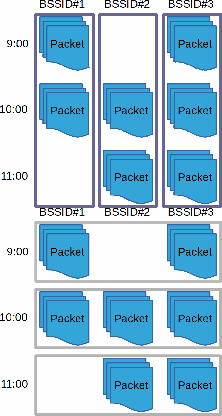
Un-Splice and Split
Time slicing is the by far most common way to split capture files, where long-running capture rolls over to a new pcap file after a pre-defined time or packet count. However, time slicing isn’t always the optimal way to split capture files. One such case is WiFi captures, where the sniffed packets might have arrived from several different networks.
Wireshark as well as tshark often run into WPA decryption issues (using wpa-psk or wpa-pwd) when the analyzed capture file contains packets from more than one BSSID. This issue can be resolved by first un-slicing the pcap files using mergecap and then splitting the packets based on BSSID with SplitCap’s “-s bssid” switch.
Un-splice and split in Windows:
Un-splice and split in Linux (you'll need to install Mono 5 first):
You'll find the BSSID-split capture files in a new subdirectory called "SplitCap". Each pcap file in this directory will only contain traffic for a single BSSID, which make them suitable for analysis with Wireshark or tshark.
Filtering on IP or Port
SplitCap can filter a large PCAP file based on one or several IP addresses or TCP/UDP port numbers. Simply use the "-s nosplit" option together with one or several "-port" or "-ip" switches to specify what traffic to keep from the large pcap file. SplitCap performs this type of filtering much faster and with way less memory usage compared to tshark.
Splitting Large PCAPs with GUI Application
Do you need to filter large pcap files based on flows / sessions?
Then please have a look at our CapLoader tool instead.
CapLoader can be used to efficiently extract full content data for a single or multiple flows from big pcap files.
Please visit our CapLoader page for more information:
https://www.netresec.com/?page=CapLoader
License = CC BY-ND 4.0
SplitCap is a free software, released under a Creative Commons Attribution-NoDerivatives 4.0 International License, which means that you can copy and redistribute SplitCap in any medium or format for any purpose, even commercially.
FAQ
-
Q: I get an error message saying Unhandled Exception: System.IO.InvalidDataException: The stream is not a PCAP file. Magic number is A0D0D0A or A0D0D0A but should be A1B2C3D4 when trying to split a capture file.
A: The capture file is a PcapNG file, but SplitCap only supports PCAP files. You can convert it to PCAP using editcap.