Erik Hjelmvik
,
Wednesday, 11 January 2017 14:30:00 (UTC/GMT)

We are releasing a new version of
NetworkMiner today.
The latest and greatest version of NetworkMiner is now 2.1.
Yay! /throws confetti in the air
Better Email Parsing
I have spent some time during 2016 talking to digital forensics experts at various law enforcement agencies.
I learned that from time to time criminals still fail to use encryption when reading their email.
This new release of NetworkMiner therefore comes with parsers for POP3 and IMAP as well as an improved SMTP parser.
These are the de facto protocols used for sending and receiving emails, and have been so since way back in the 90’s.
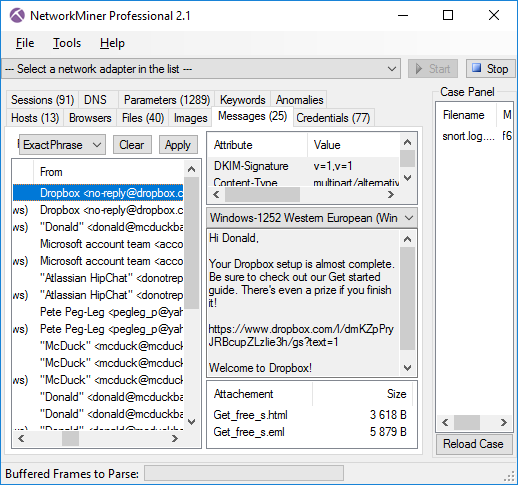
Messages tab in NetworkMiner 2.1 showing extracted emails
Not only does NetworkMiner show the contents of emails within the tool, it also extracts all attachments to disk and even saves each email as an
.eml file that can be opened in an external email reader in order to view it as the suspect would.

Extracted email ”Get_free_s.eml” opened in Mozilla Thunderbird
Encapsulation Protocols
There are several protocols that can be used to provide logical separation of network traffic,
in order to avoid using multiple physical networks to keep various network segments, security domains or users apart.
Some of these techniques for logical separation rely on tagging or labeling, while others are tunneling the encapsulated traffic.
Nevertheless, it’s all pretty much the same thing; an encapsulation protocol is used in order to wrap protocol X inside protocol Y,
usually while adding some metadata in the process.
NetworkMiner has been able to parse the classic encapsulation protocols
802.1Q,
GRE and PPPoE since 2011,
but we now see an increased use of protocols that provide logical separation for virtualization and cloud computing environments.
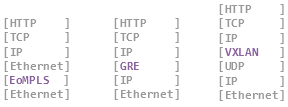
We have therefore added parsers in NetworkMiner 2.1 for
VXLAN and OpenFlow,
which are the two most widely used protocols for logical separation of traffic in virtualized environments.
We have also added decapsulation of MPLS and EoMPLS (Ethernet-over-MPLS) to NetworkMiner 2.1.
The new release additionally comes with support for the SOCKS protocol,
which is an old school encapsulation protocol used by administrators as well as hackers in order to bypass firewalls or provide anonymous Internet access.
The SOCKS parser in NetworkMiner can even be used to read network traffic from
Tor in cleartext before it enters the Tor network.
However, in order to capture Tor’s SOCKS traffic you’ll have to
sniff traffic from the Tor client’s localhost interface on TCP port 9150.

PacketCache
NetworkMiner 2.1 can read packets directly from a local
PacketCache service by clicking ”File > Read from PacketCache”.
This eliminates the need to run a PowerShell script in order to dump a PCAP file with packets recently captured by PacketCache.
HTTP Partial Content / Range Requests
Byte serving is a feature in HTTP that makes it possible to retrieve only a segment of a file, rather than the complete file, by using the “Range” HTTP header.
This feature is often used by
BITS in order to download updates for Windows.
But we have also seen malware use byte serving, for example malware droppers that attempt to download malicious payloads in a stealthy manner.
See Ursnif and
Dridex
for examples of malware that utilize this technique.
NetworkMiner has previously only reassembled the individual segments of a partial content download.
But as of version 2.1 NetworkMiner has the ability to piece together the respective parts into a complete file.
SSL/TLS and X.509 Certificates
NetworkMiner has been able to extract X.509 certificates to disk for many years now, simply by opening a PCAP file with SSL traffic.
However, in the 2.1 release we’ve added support for parsing out the SSL details also from FTP’s “AUTH TLS” (a.k.a explicit TLS or explicit SSL)
and STARTTLS in SMTP.
NetworkMiner now also extracts details from the SSL handshake and X.509 certificate to the Parameters tab,
such as the requested SNI hostname and the Subject CN from the certificate.
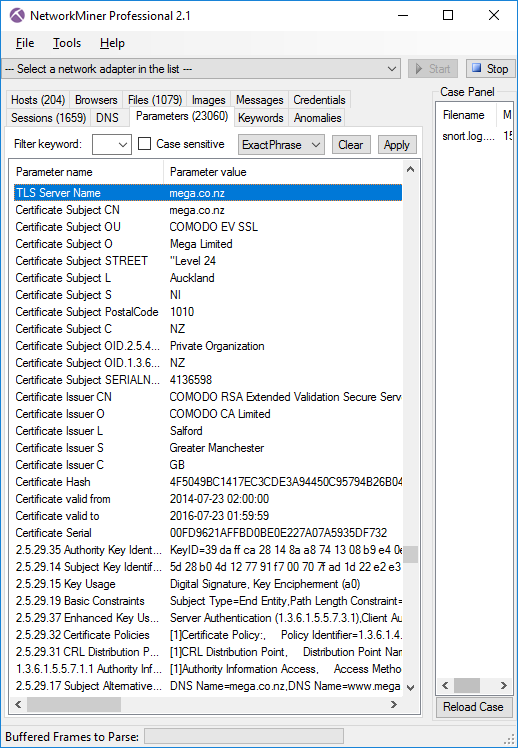
SSL handshake details and certificate info passively extracted from captured HTTPS session to mega.co.nz
NetworkMiner Professional
The new features mentioned so far are all part of the free open source version of NetworkMiner.
But we have also added a few additional features to the
Professional edition of NetworkMiner as part of the 2.1 release.
The “Browsers” tab of NetworkMiner Professional has been extended with a feature for tracking online ads and web trackers.
We are using EasyList and EasyPrivacy from easylist.to in order to provide an up-to-date tracking of ads and trackers.
HTTP requests related to ads are colored red, while web tracker requests are blue.
These colors also apply to the Files tab and can be modified in the Settings menu (Tools > Settings).
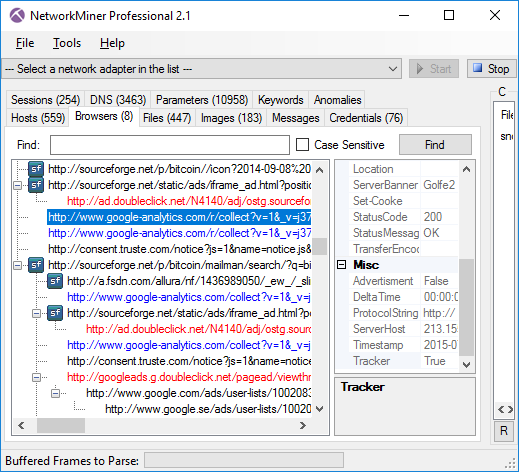
NetworkMiner Professional 2.1 showing advertisments (red) and Internet trackers (blue).
The reason why NetworkMiner Pro now tracks ads and trackers is because these types of requests can make up almost half of the HTTP requests that a normal user makes while surfing the web today.
Doing forensics on network traffic from a suspect criminal can be a very time consuming task,
we therefore hope that being able to differentiate between what traffic that is initiated by the user rather than being triggered by an online advertisement service or internet tracker can save time for investigators.
The RIPE database previously contained a bug that prevented NetworkMiner Professional from properly leveraging netname info from RIPE.
This bug has now been fixed, so that the Host Details can be enriched with details from RIPE for IP addresses in Europe.
To enable the RIPE database you’ll first have to download the raw data by clicking Tools > Download RIPE DB.
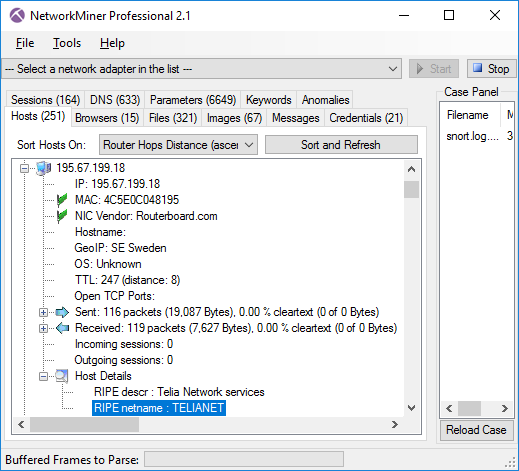
Host Details enriched with RIPE description and netname
We have also extended the exported details about the hosts in the CSV and XML files from NetworkMiner Professional and the command line tool
NetworkMinerCLI (available to users with a corporate license).
The exported information now contains details such as IP Time-to-Live and open ports.
Upgrading to version 2.1
Users who have purchased a license for NetworkMiner Professional 2.0 can download a free update to version 2.1 from our
customer portal.
Those who instead prefer to use the free and open source version can grab the latest version of NetworkMiner from the official
NetworkMiner page.
Credits
There are several persons I would like to thank for contributing with feature requests and bug reports that have been used to improve NetworkMiner.
I would like to thank Dietrich Hasselhorn,
Christian Reusch, Jasper Bongertz,
Eddi Blenkers and Daniel Spiekermann for their feedback that have helped improve the SMB, SMB2 and HTTP parsers as well as implementing various encapsulation protocols.
I would also like to thank several investigators at the Swedish, German and Dutch police as well as EUROPOL for the valuable feedback provided by them.
Posted by Erik Hjelmvik on Wednesday, 11 January 2017 14:30:00 (UTC/GMT)
Tags:
#NetworkMiner
#POP3
#SMTP
#IMAP
#VXLAN
#encapsulation
#decapsulation
#X.509
#PCAP